How Reserrva works for a tattoo studio
In a barbershop, almost everything is booked at a fixed price: haircut, beard, thirty minutes. A tattoo studio doesn't work like that. Before a session there is an idea, some reference photos, a placement, a size and a conversation about price. Most of the time all of that is scattered across Instagram DMs, WhatsApp voice notes and a notebook.
Reserrva puts that journey into four steps: request → quote → acceptance → session. The customer describes the idea, you answer with a price, a duration and an expiry date, the customer accepts and the appointment lands in the artist's calendar with the agreed amount saved.
This guide follows that path from the studio's side. If you're after the barbershop journey, with fixed-price services, read the general Reserrva guide.
The screenshots come from a demo studio, Tinta Norte, with fictional artists and customers. None of the data belongs to a real person. The panel in the screenshots is in Spanish; in English the screens are the same, with English labels. You can open every image at full size.
1. Create the studio and add your artists
Start by creating your studio. You sign in with Google or with a link sent to your email. In the first step you pick Tattoo studio instead of barbershop. That choice shapes what comes next: the suggested services, the wording in the panel and the Requests section, the inbox where your customers' ideas arrive.

Next you add the address, the studio's opening hours and how you appear yourself: as an artist who takes appointments, or only as the person who runs the studio. If you rent a booth or work alone, a one-person studio is enough.
Artists are the team
Each tattoo artist is a member of the team, with a public name, a short description of their style and their own schedule. Invite them from Team: the invitation goes by email, or you can copy the link and send it over WhatsApp. Only someone signed in with the invited email can accept it.
The description matters more than it looks. "Blackwork, geometric and fine line" helps customers choose an artist and helps you route requests. If someone doesn't do colour, say so there.
2. Fixed-price services and custom pieces
Two kinds of work live side by side in a studio. Some pieces you can charge at a fixed price: a small flash from your sheet, a design consultation, a touch-up. And then there's the custom piece, which nobody can price without seeing the idea.
Reserrva treats them differently. A priced service is booked like in any calendar: the customer picks an artist, a day and a time, and that's it. A service in Quote mode has no public price and can't be booked directly: the customer sends a request and you quote it. In your service list you'll spot it by the request tag and by the word Quote where the price would be.
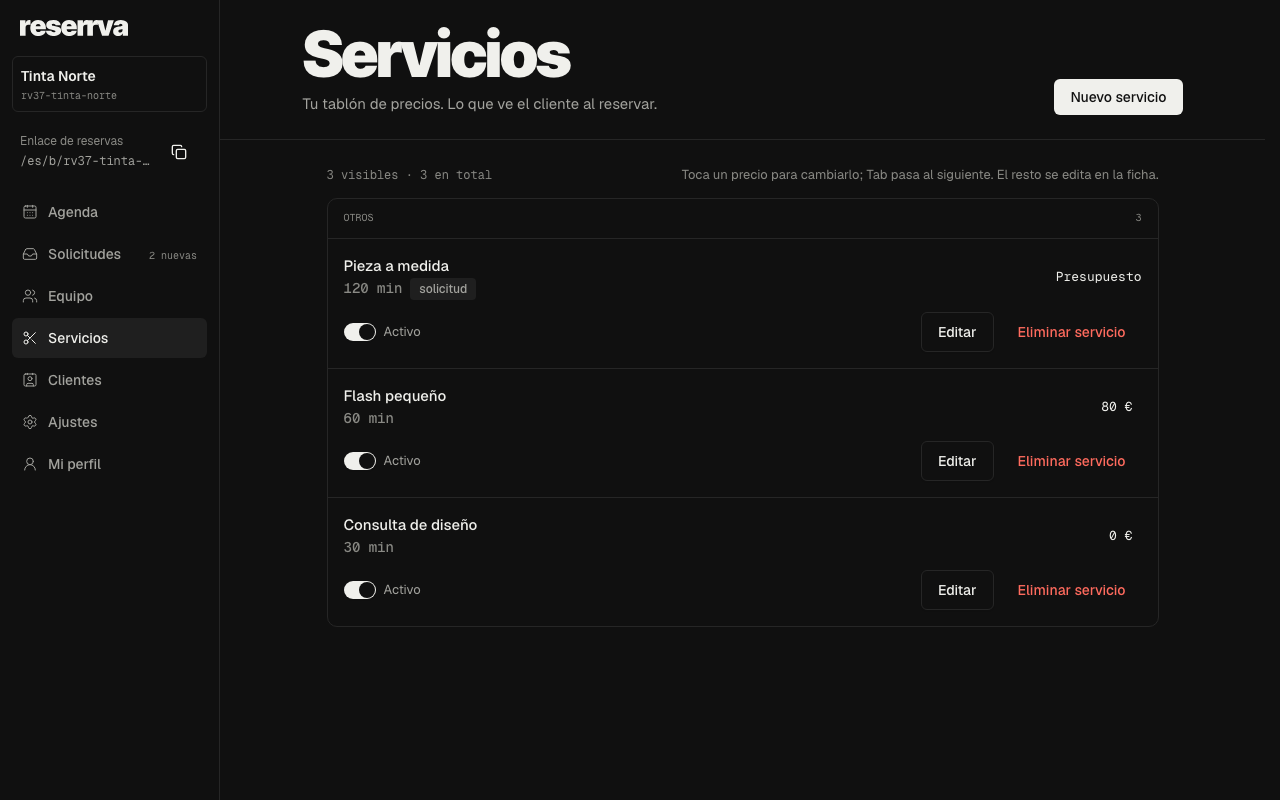
The custom piece's duration is only a guide, so the service displays properly on your page. You set the real duration of each job when you quote it.
Your public page
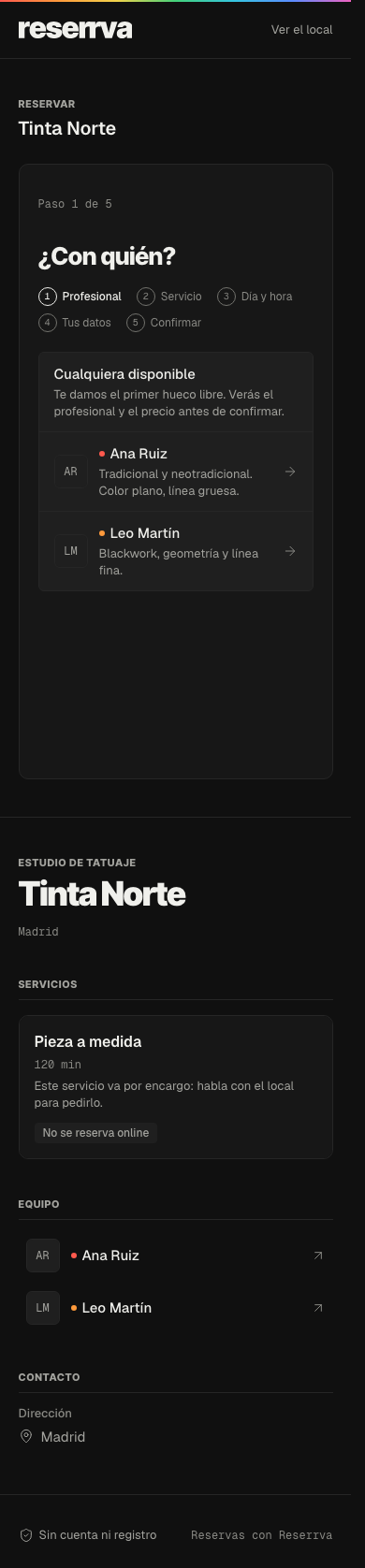
When you finish signing up you get a booking link, like reserrva.app/en/b/your-studio. Put it in your Instagram bio and in your WhatsApp replies. On that page customers see your artists, their descriptions and your services. Fixed-price services are booked from there; the custom piece is marked "Not bookable online", with a note that it's requested from the studio.
3. A request brings the whole idea
A request is the file for one idea. It holds what the customer wants tattooed and everything that helps you quote it:
- The idea, in their own words.
- Placement on the body and approximate size.
- Style, and whether they want it in colour or black.
- References: photos of other tattoos, sketches or illustrations.
- The customer's budget, if they want to share it.
- Preferred artist and the time windows when they could come, if they have them.
Today requests arrive through Reserrva's customer channels, such as the connected AI assistants covered in section 8. On your public web page the custom piece is listed but doesn't have its own form yet: the customer sees that they should ask the studio. If someone messages you on Instagram, reply with your link and with what you need to know to quote.
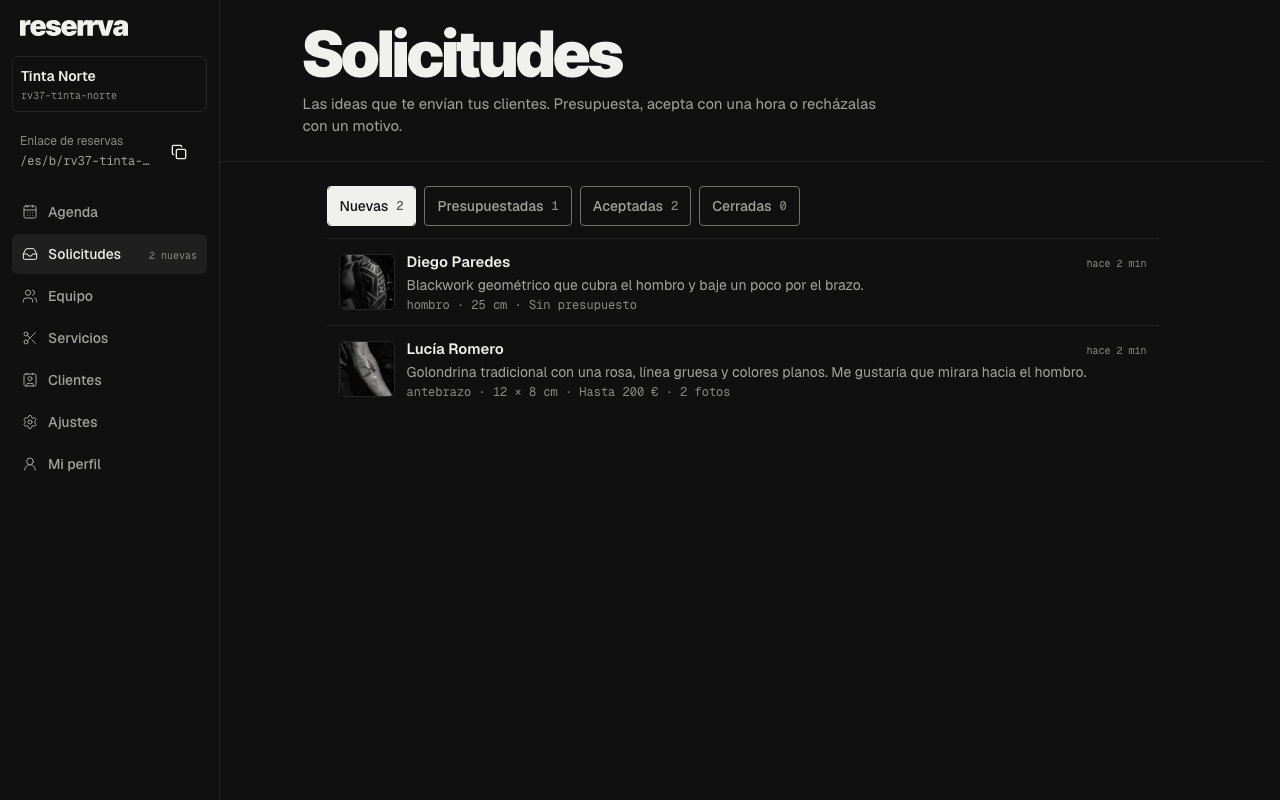
Every request lands in Requests, in the panel menu. The inbox has four tabs: New, Quoted, Accepted and Closed. Each row shows the name, the idea in one line, placement, size, budget, how long ago it arrived and a thumbnail of the first reference. Next to Requests, the side menu shows how many new ones are waiting for an answer.
Open a request to see the full file: the idea, a table with placement, size, style, colour, budget, service and artist, and the references at a useful size. Photos are private: only the studio team sees them, through temporary links.
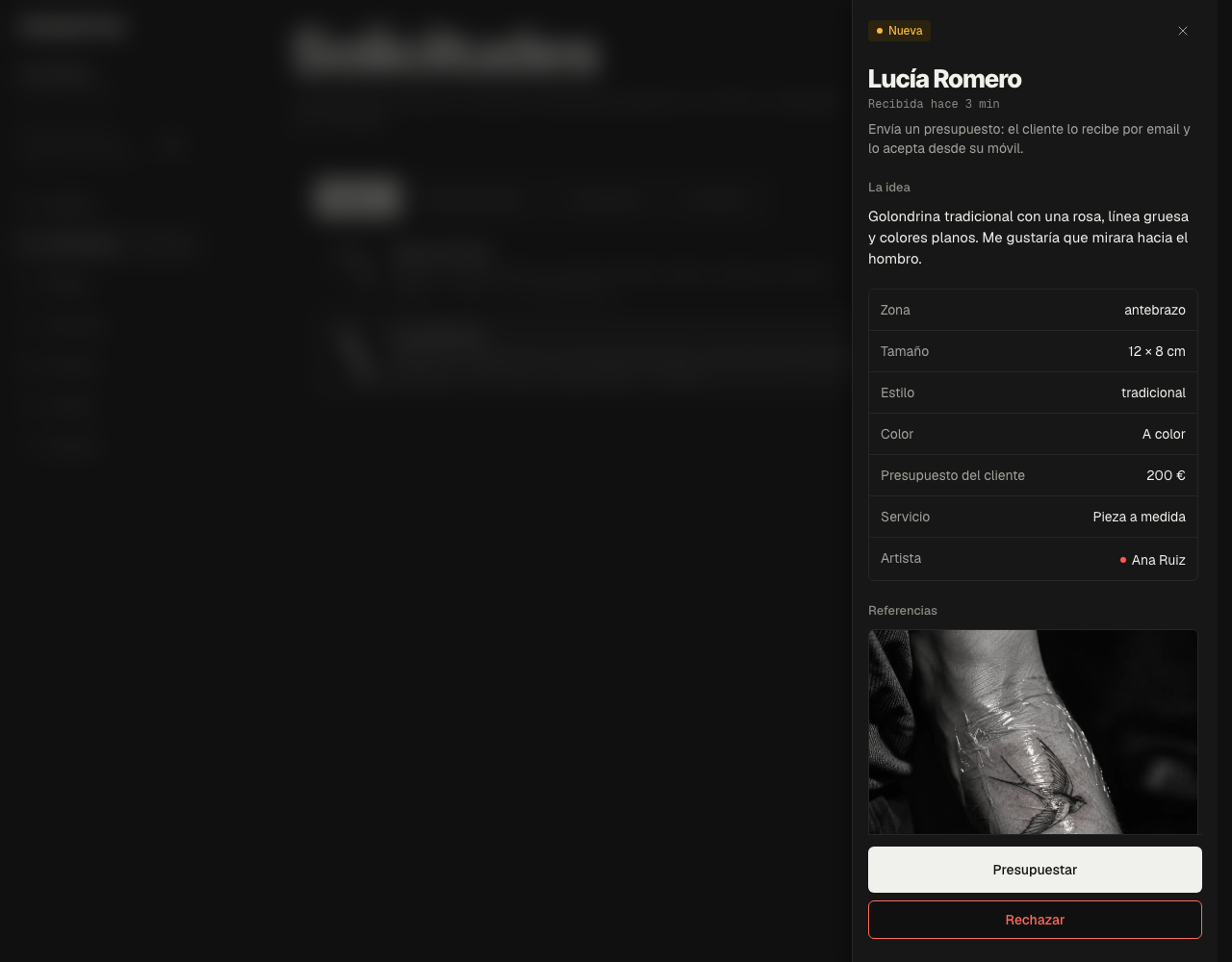
If an idea isn't a fit for the studio, Decline closes it and lets you add a short reason, for example "We don't do colour realism". The customer gets an email with that reason.
4. Quoting: price, duration and expiry
Press Quote and fill in:
- The artist who will do the piece.
- The total price, in the studio's currency.
- The session duration, in steps of your calendar interval.
- An optional note for the customer: what's included, how many sessions, how to come prepared.
- Valid for: seven days by default, up to thirty. After that the quote expires and moves to Closed.
If your studio has Stripe payments turned on, you'll also see a deposit field: the amount the customer pays to confirm the appointment. Without payments turned on, that field doesn't appear.
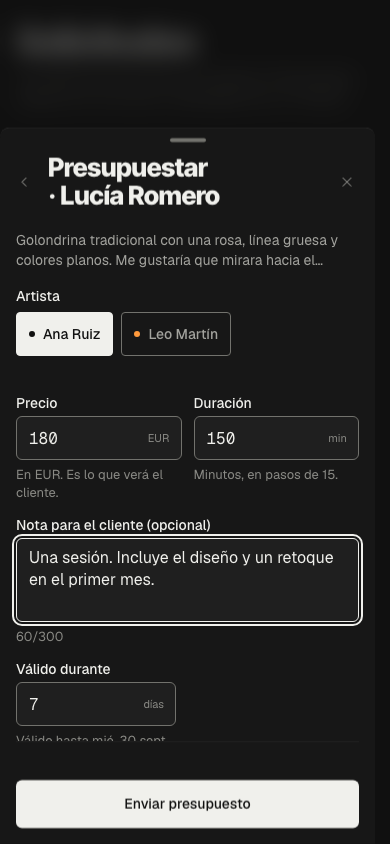
When you send it, the customer gets an email with the price, the duration, the deposit if there is one, the expiry date and your note, plus a link to accept. The request moves to Quoted. Until they accept, you can change the quote: the customer always sees the latest version.
For what to put in the note and how to explain the price, there's a separate guide on what to include in a tattoo quote.
Sessions in a single place
In Reserrva you define services, durations and artists, and every session lands on the studio calendar, with each person seeing what their role allows.
Create my studio/en/onboarding?kind=tattoo_studio5. The customer accepts; the session takes shape
The customer opens the link in the email and signs in with the same email they used to ask for the quote. They see their idea, the price, the duration, the expiry date and your note, and a single button: Accept quote.
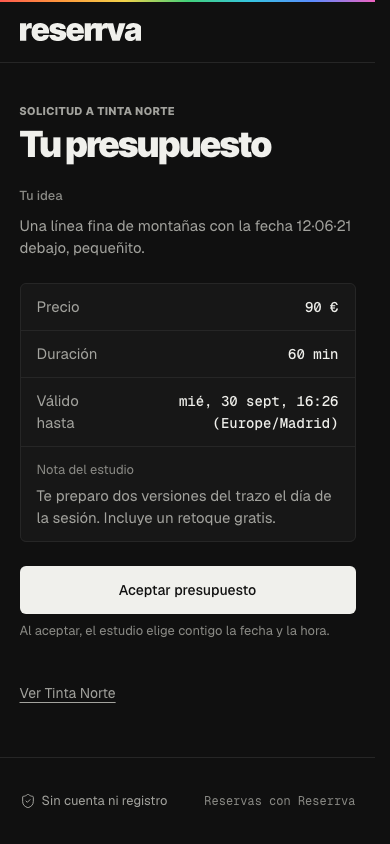
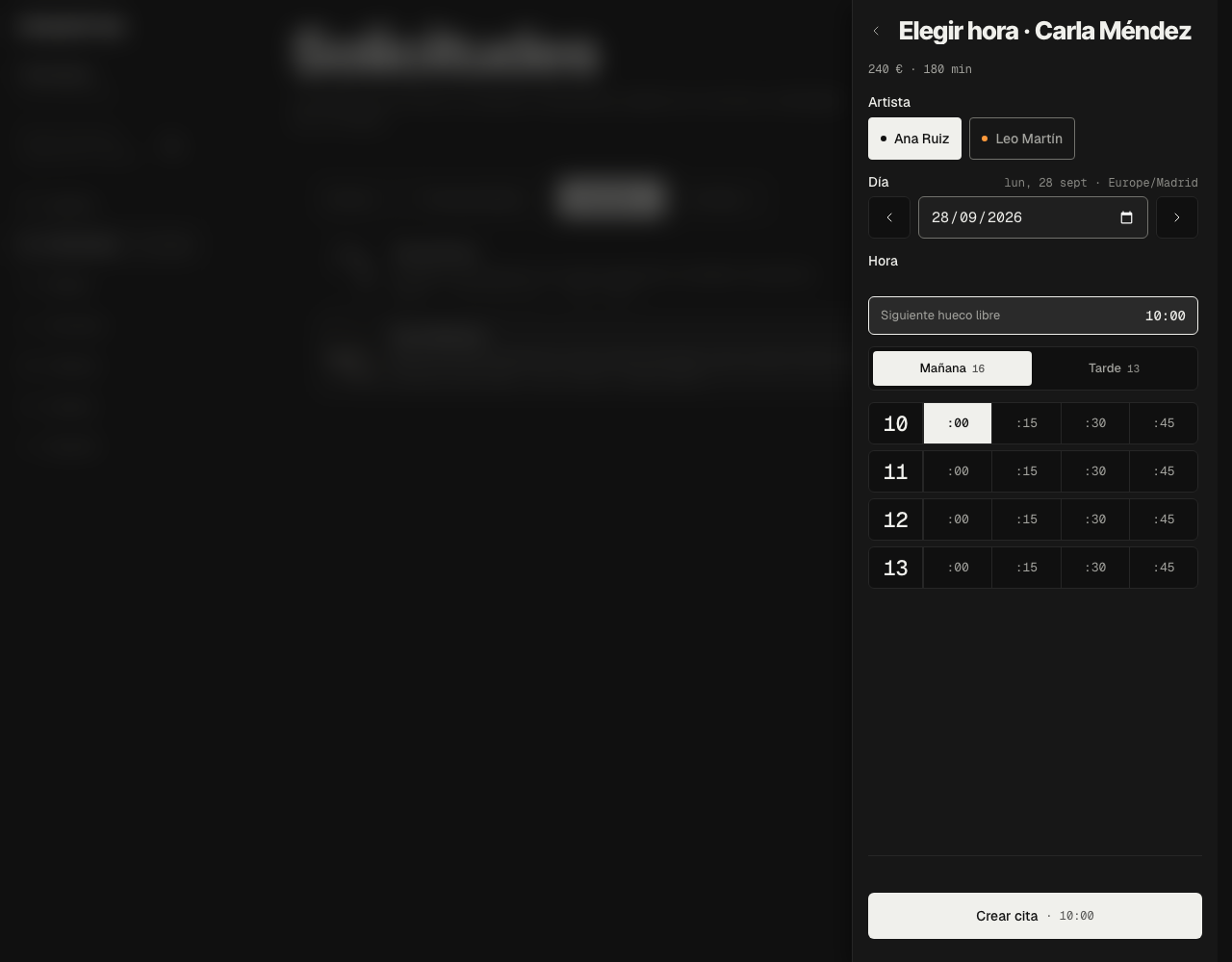
Once they accept, the request moves to Accepted in your inbox. Now it needs a time. Open the request and press Pick a time: choose the artist and the day, and you'll only see the slots where the quoted duration fits without overlapping other appointments. If the customer gave you preferred windows, the picker starts on the first one.
When a customer uses an AI assistant connected to Reserrva, they can accept and pick the time in one step. That's covered in section 8.
6. The session, in the artist's calendar
The appointment shows up in the calendar like any other, in the artist's column and with the quoted duration. The price and duration are saved on the appointment: if you later change the rate for custom pieces, this session keeps what was agreed.
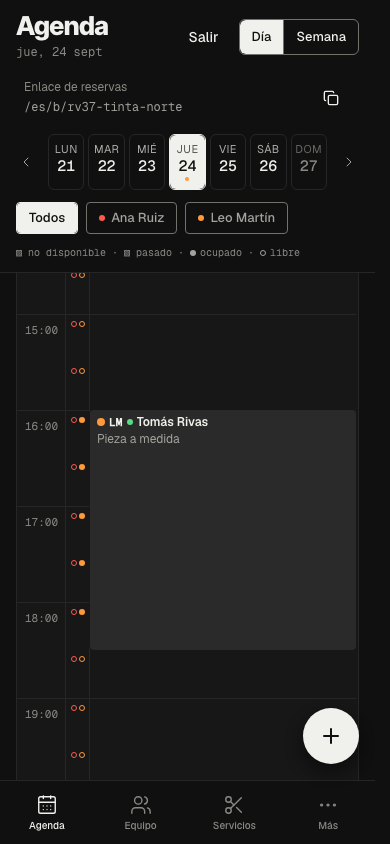
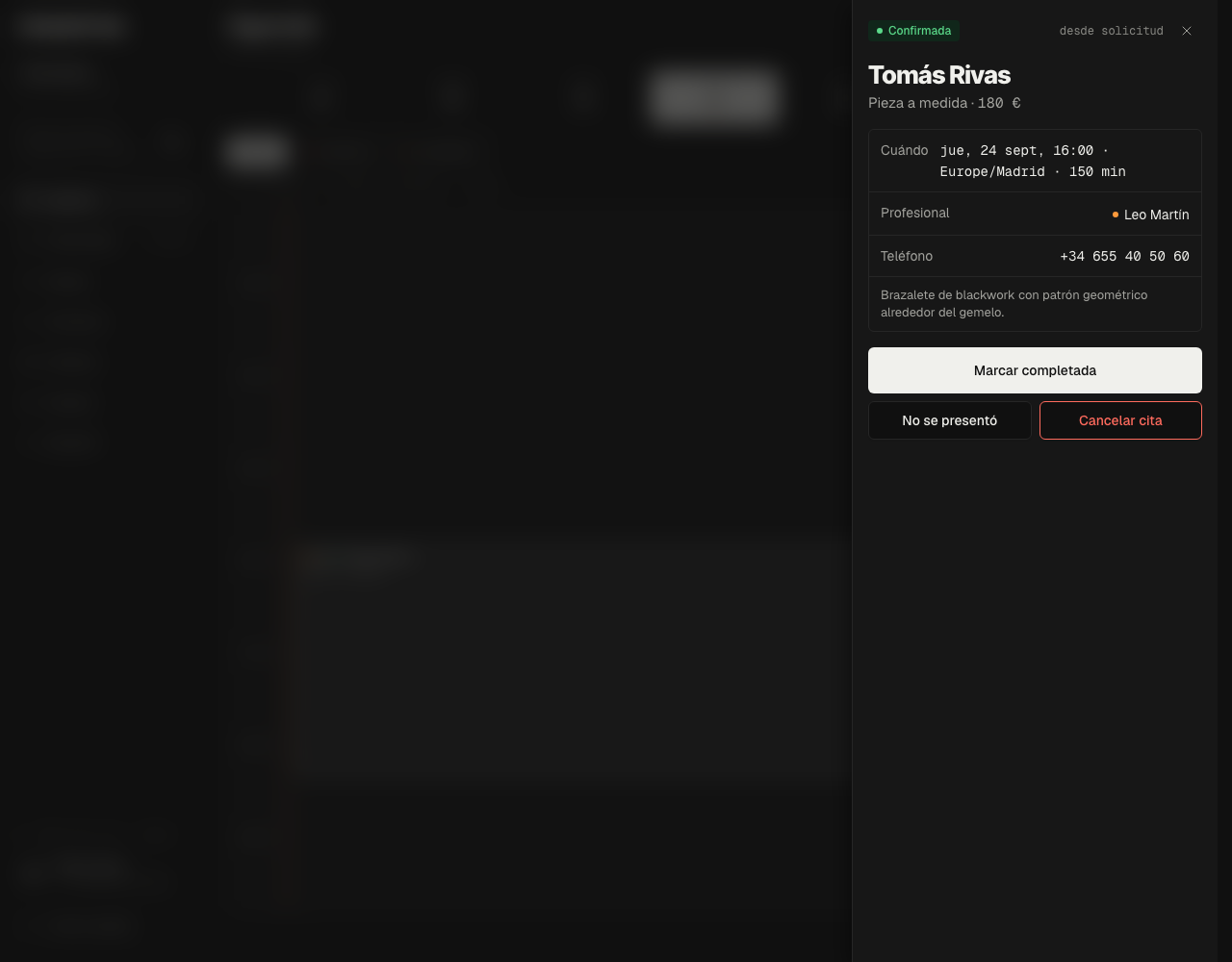
Tap it to see the customer, the time with the studio's time zone, the artist, the phone number and the original idea. The from request tag reminds you where it came from. When the session is over, mark it completed. If the customer doesn't come, No-show. That way the calendar and each customer's history reflect what actually happened.
7. Deposits: Stripe where available, bank transfer where not
Asking for a deposit is standard in studios: the customer is reserving hours of your calendar and often a design you'll prepare beforehand. Reserrva gives you two ways to handle it.
With Stripe Connect. On plans that include it, you connect your Stripe account from Settings → Payments. From then on, the quote form includes the deposit. When the customer accepts and the appointment is created, it stays pending until they pay the deposit by card; then it's confirmed. The money goes to your Stripe account. Reserrva takes no commission per appointment, and confirmation only happens when Stripe reports that the payment went through, never just because someone came back from the payment page.
By bank transfer. Stripe Connect isn't available in every country or on every plan. If you don't have it, send the quote without a deposit and agree on payment the way you already do: bank transfer, Bizum, Mercado Pago or cash at the studio. Spell it out in the quote note ("To confirm, transfer €50 to…") and confirm the appointment once you've received it.
Whichever method you use, write your policy down in advance: how much you ask for, whether it comes off the total and what happens if the customer cancels. There are ideas for wording it in the guide to a tattoo deposit policy.
8. What an AI assistant sees of your studio
More and more people ask ChatGPT or Claude instead of searching on Google. Reserrva has a concierge for those assistants: an MCP server anyone can connect to their assistant. So someone can type "I'm looking for a blackwork studio in Madrid" and get an answer built on real data.
About your studio, the assistant sees the same as your public page: name, city and address, opening hours, artists and their descriptions, services with price and duration, and which ones go through a quote. With that it can:
- Suggest your studio and the next free slots for fixed-price services, and book them in the customer's name.
- Send you a request for a custom piece with the idea, placement, size, style, colour, budget and preferred windows. It lands in the same inbox as any other.
- Once you've quoted, read the price and duration back to the customer and accept with a specific time. If you asked for a deposit, the appointment stays pending until the customer pays it on Reserrva. An assistant never takes payment.
Photos can't be attached from an assistant yet. If a request arrives without references, ask for them on WhatsApp from the request before you quote. The assistant doesn't see your panel, your inbox or other customers' data: it always acts as the customer who is using it.
9. Before you share the link
- The studio is set up as a Tattoo studio, with the right address, hours and time zone.
- Every artist has a recognisable public name and a description of their style.
- The custom piece is in Quote mode; flash and consultations have real prices and durations.
- You know where the Requests inbox is and who on the team answers it each day.
- You've decided your default quote validity and what goes in the note.
- Your deposit policy is written down: through Stripe if it's on, by transfer if not.
- You've opened your public page on a phone and it's clear what is booked and what is requested.
Answering quickly is what people notice most. A request that has sat in New for three days has probably gone to another studio. Check the inbox every day, the same way you check your messages.
Frequently asked questions
Does the customer need an account to ask for a quote?
To ask for a quote and accept it, yes: they sign in with their email, because the request and the quote are theirs and only they can accept them. To book a fixed-price service they don't need an account.
Can I change a quote I've already sent?
Yes, as long as the customer hasn't accepted it. From Quoted, open the request and press Change quote. The customer will see the new version.
What happens when a quote expires?
It moves to Closed and the customer can no longer accept it. If they're still interested, they can send a new request or you can quote it again.
Do I have to use Stripe to take deposits?
No. If you don't have Stripe Connect, send the quote without a deposit, agree on payment by bank transfer or another method, and explain it in the note.
Does every artist see every request?
Owners and managers see and handle the whole inbox. Each artist works with the requests assigned to them, according to the team's permissions.
Set up the studio calendar
Create your studio, define your services and make it clear who handles each consultation and each session.
Create my studio/en/onboarding?kind=tattoo_studio